
The Murideo Six-G and Seven-G pattern generators can be automatically controlled by Calman to generate precise test patterns used for display measurement and calibration. When connected, Calman can trigger the appropriate patterns in real time, ensuring accurate evaluation of luminance, color, and grayscale performance. These pattern generators support calibration workflows for SDR, HDR, and Dolby Vision displays, making them a reliable external pattern source for professional and enthusiast display calibration.
Calman Required Version
- Calman Studio or Ultimate v5.15.5 or higher
Supported Murideo Models
- Six-G (4K)
- Six-G 8K
- Six-G 8K Metal
- Seven-G
- Seven-G 8K
Murideo Connection
- RS-232 serial
- For use with USB, see: FTDI USB to Serial Converter
To connect the Murideo to Calman:
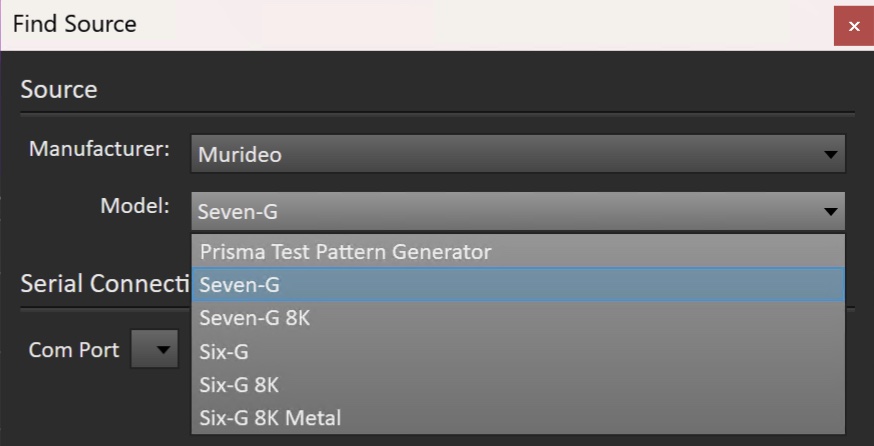
- On the Calman Source Settings tab, click the Find Source button.
- On the Calman Find Source dialog, select Murideo and select your model
- Select the appropriate COM Port
- Check Device Manager for the assigned COM port.
- Click Connect
| Note: Murideo SIX-G units with version 2.xx firmware are able to select 3840×2160 resolutions in a “4K Geometry” mode. If the unit is in its 4K Geometry mode while attempting to connect to Calman, an error message will be produced that states “Firmware or application not up to date, check for a newer version. To avoid this error and connect normally, switch the Murideo SIX-G out of its 4K Geometry mode before connecting to Calman. |
More Info:
- For detailed operating instructions, please refer to the official Murideo user guides